
Documenting has never been so easy
Generate API documentation for your C# and VB .NET code

When you generate an RTF documentation and open it in Microsoft Word or free Microsoft Word Viewer, you usually don't see the page numbers in table of contents and index.

Not updated TOC in RTF

Not updated Index in RTF

The numbers in TOC and INDEX are implemented as fields. Usually, Word
doesn't automatically update them. When the fields are updated, the output should look as follows:
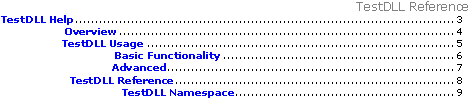
Updated TOC in RTF

Updated Index in RTF

Solution

  • To update the fields in MS Word just do Print preview.
  • To update the fields in MS Word Viewer, navigate to View menu. Switch from Print Layout to Normal and then back to Print Layout.

Then save the RTF document to store the changes.


Start generating your .NET documentation now!

DOWNLOAD

Free, fully functional trial

A few years ago, we gave a test to several products to document our source code. We finally chose VSdocman mostly because it was easy to use, from within the development environment, making training of programmers useless. It provides flexible features which enables producing complete documentation for people using our products and also for internal use. When technical support is required (we needed this when switching to VS 2015), Peter answered our emails very quickly. After more than 3 years with VSdocman, we strongly recommend the product which is amazingly easier to use than SandCastle.

Pierrick Combreau, Product Manager, Quotalys Ltd

Cookies user preferences
We use cookies to ensure you to get the best experience on our website. If you decline the use of cookies, this website may not function as expected.
Accept all
Decline all
Marketing
Set of techniques which have for object the commercial strategy and in particular the market study.
Quantcast
Accept
Decline
Save