


Start VSdocman Comment Editor and select Advanced tab.
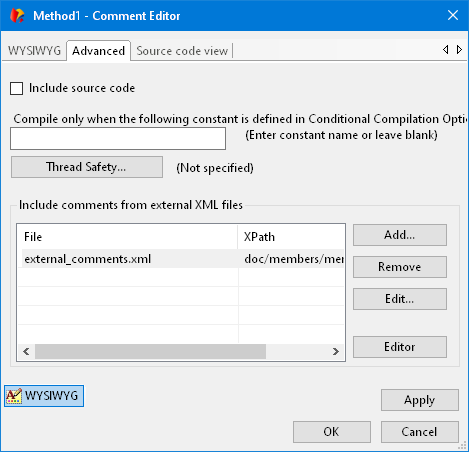
Include source code
Corresponds to <includesource> tag.
Compile only when the following constant is defined...
Corresponds to <compilewhen> tag. Leave blank if this member should be always compiled. If you enter a constant name here, the member will be only compiled when the constant specified in this field is also listed in Code Members-Conditional Compilation options.
Thread Safety...
Corresponds to <threadsafety> tag.
Include comments from external XML files
Corresponds to <include> tags. You can refer to comments in another file(s) here. Moreover, you can directly edit the XML files in the editor. The Editor button opens the topic from the external XML file in a new WYSIWYG editor window. This way you can easily store and edit your entire topics in separate XML files and include them with <include> tags.
