


Go to Tools - VSdocman menu or press VSdocman button on standard toolbar. VSdocman dialog appears, select Project Properties pane. Set Code Members - Conditional Compilation page.
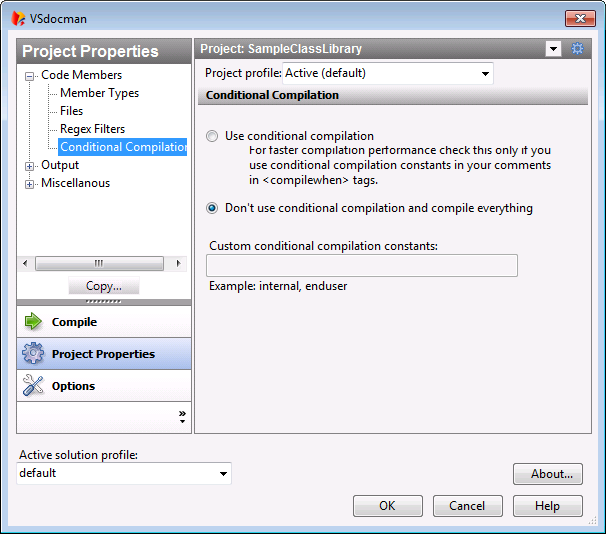
You can tell VSdocman which members should or shouldn't appear in the resulting documentation. By default, all members that satisfy selected conditions in Code Members - Member Types options are included. You can set globally if you want to include private, public, non-commented and other members.
In addition to this, you can specify individually for each member whether it should be included in documentation. For example, you have specified that private members should go to compilation. However, you have one private method which you don't want do compile. You can use the <compilewhen> tag in your comments to say when this member should be compiled. The value of this tag is constant and the member will only be compiled if that constant is listed in this dialog. This way you can perform conditional compilation of your documentation.
 Examples
If you never want to include the member, use some constant that will never be listed in this dialog, e.g. never. Note, other members without compilewhen tag will always be compiled, no matter which constants are specified in this dialog.
If you want to include some member in your internal documentation used by your team but not in the normal documentation designed for end-user, use conditional constant e.g. internal.
To create the internal documentation, just enter internal in Custom conditional compilation constants field in this dialog. To create the end-user documentation, just leave this field blank. Constant internal is not specified in this case and the member will not be included. |
||||||||||||||||
Dialog fields
Use conditional compilationCheck this if you use conditional constants in your comments. This will ensure that comments are parsed during initial analysis and compilewhen tags are processed. You can leave this option checked even when you don't use conditional constants but this will prolong compilation time. Don't use conditional compilation and compile everythingIf you check this option, the compilewhen tags are ignored and compilation will be faster. Custom conditional compilation constantsHere you can specify the compilation constants. If the member contains compilewhen tag, the member will be included only if a constant mentioned in that compilewhen tag is listed here. You can specify any constant you wish. The constant cannot contain whitespace and it is case insensitive. To list more than one constant, use commas. |
