
- Details
It surely happened to many of us. All of a sudden, IntelliSense is no longer working as expected. The most apparent sign of this is that you no longer see the compiler error underlines in your code at design time. For example, the duplicate declaration error below is not reported:

However, if you build the project, you get the errors in the output window. Moreover, these errors are not necessarily listed in the Error List window. My experience is that if you display them for Build + IntelliSense (which is probably the default setting), the build errors are not listed.

However, if you switch to Build Only, the error is listed after the build has finished unsuccessfully.

The situation may also be quite opposite. There is no error in the code and the project build fine. But IntelliSense keeps displaying the compile errors.
Solutions
If you need a quick fix, jump directly to the solution 4.
Solution 1
Restarting Visual Studio doesn't help. We need to delete the wrong IntelliSense cache. It's stored in the .vs folder in the solution root folder. The easiest way is to close the solution and manually delete the .vs folder. This will help. But it erases all your user-specific settings, such as open documents, bookmarks, breakpoints, configuration, etc.
Solution 2
A less invasive solution would be to delete only the .suo file inside the .vs folder. But still, this file contains many other settings that will be lost along with the IntelliSense cache data. And what's worse, it doesn't help in some cases. For example, I've encountered the following situation. I deleted the .suo file. After I opened the solution, IntelliSense was working fine. But this deletion has reset my other settings, including Configuration+platform. It reset my solution configuration to Debug|Mixed platforms. This is not what I wanted, and I changed it to Debug|AnyCPU. And guess what… The IntelliSense problem appeared again. But only in the Debug|AnyCPU. If I switched to Debug|Mixed platforms or Release|AnyCPU, everything was working fine. But there was no way to reset the wrong cache and keep the solution in Debug|AnyCPU.
Solution 3
The only solution is to delete only the IntelliSense data from the .suo file while keeping all other settings. The solution user options (.suo) file is a structured storage, or compound, file stored in a binary format. It contains multiple streams with unique names. Our goal is to delete just those streams that contain the wrong data and keep all the others.
There are several tools for viewing and writing the compound file binary files:
- SSView with a nice GUI, but is not free for commercial use.
- Free suo command line tool. But it only allows reading the files, not writing.
If you want to write your own tool or VS extension, there is a free C# library called openmcdf, also available as NuGet. VSIX developers may use dedicated interfaces, but I'm not sure that they allow enumerating the existing streams in the file.
The simplest way is to do it manually. Close the solution and open the .suo file in SSView. It will list all the streams and because many of them have quite self-explanatory names, you get the picture of what is stored in this file. This is not the case for the IntelliSense data. The names are not that obvious, but they have suffixes: _ProjState and _TFMCaps.

They are in pairs, and it seems that each pair corresponds to a language used in the solution. For example, I found two language services in my solution above. One for C# and one for VB, as our solution contains projects written in both languages. Just right-click on each of them and select Delete. That's all. There's no Save button. Just close the tool and reopen the solution in VS. Everything should work now and no visible setting should be lost. I suspect that the deleted streams contained also other data in addition to the IntelliSense cache, but I didn't notice anything in VS GUI.
Solution 4
I've implemented the solution 3 in a new free Visual Studio extension named Clear Solution IntelliSense Cache. You can install it in your VS and fix the issue with a single click.

- Details
You can automate Visual Studio by getting or creating an instance of EnvDTE.DTE. For example, you can create a new VS 2015 instance with the following code:
System.Type dteType = Type.GetTypeFromProgID("VisualStudio.DTE.14.0", true);
EnvDTE.DTE dte = (EnvDTE.DTE)System.Activator.CreateInstance(dteType);
Each Visual Studio version has its own progID. For example, VS 2015 has "VisualStudio.DTE.14.0" and VS 2013 has "VisualStudio.DTE.12.0".
- Details
As you know, almost every operation in Visual Studio is implemented as a named command. Visual Studio provides its built-in commands and extensions can add their own. For example, our VSdocman provides commands for compiling a documentation. You can invoke the commands from Command Window. Just start typing and it will offer you a list of available commands. You can optionally supply arguments for the command. When you press Enter, the command will be executed. For example, if you type Help.About, the About window will be displayed. Similarly, if you type VSdocman.CompileProject "SampleClassLibrary", it will compile a documentation for the SampleClassLibrary project.
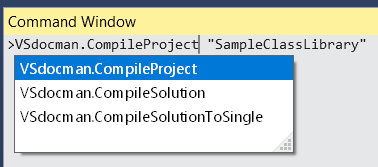
While you can run any batch command in your build events, there's no way to execute a Visual Studio command during the build (at least, I'm not aware of any). So I created a reusable MSBuild task that you can use for executing any named VS command, when the build is performed inside Visual Studio.
- Details
When you write XML doc comments in your .NET code for your internal purposes, you usually don't care about their formal perfectness. All you need is to be clear and precise.
The situation is however different, when it comes to commenting an API that will be publicly available to the end-users. The documentation must be clear, formally correct and consistent.
I'm not going to talk about a grammar, English is not my strong point. But I will show you the most common mistakes and some simple rules that can make your documentation even better. The list is by no way complete. I collected it from my experiences with my own or my clients' APIs and from what I have observed in MSDN. The points are in random order. All improvements can be done manually without any tool, but where appropriate, I will show how they can be simplified with our VSdocman, especially with its WYSIWYG comment editor.
1. Don't hardcode true, false, null, Nothing, static and other language specific keywords.
2. Don't put “obsolete” info directly in XML comments, use ObsoleteAttribute.
3. Use a definition list for describing predefined values
4. Document each enumeration item, don't place its description to the parent enumeration comments
5. Don't duplicate enum description in methods that use the enumeration
6. Use <see> if you're referring to another member
7. Use <paramref> if you're referring to another parameter in the same method
8. Member summary is a description, not a command
- Details
It was some time ago when a user of our VSdocman reported about 20 second delay when he invoked some of its functions. It wasn't that easy to fix it because we couldn't reproduce the issue on our side. Finally we have found the reason, created a workaround in our code and forgot it.
Recently, I've encountered a similar problem and it took some time to recall that we have already faced it. So I'm putting the info here for my own reference and for anyone else.

