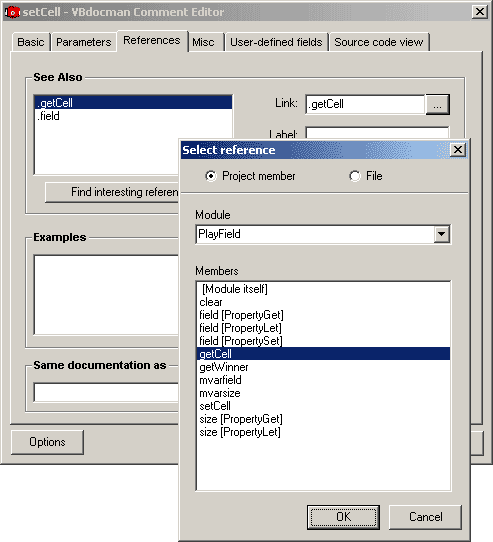
Start VBdocman Comment Editor and select References tab.
This dialog allows to edit all references that may appear in the member's documentation. User is not required to know the link syntax, target objects may be selected by dialog.
See also
Edit See also links. Corresponds to @see tag. Use Add and Remove buttons to add new link or delete selected one from the list on the left.
Link
The target of the link as specified in @see syntax. There's a button that invokes Select reference dialog. User can select the target from the list, whether the member in the project or external file.
Label
Link label shown in documentation. See the @see syntax.
Find interesting references
This button brings some intelligence to the comment editor. When you press it, editor automatically shows a list of suggested links that might appear in See Also section. You can then select which are to be inserted. VBdocman looks for implemented or implementing classes of current class, argument types of current method or types used inside current method.
Examples
Edit Examples links. Corresponds to @example tag. Use Add and Remove buttons to add new link or delete selected one from the list on the left. You can also create new or edit existing example files directly from this dialog.
Link
The target file path containing example code as specified in @example syntax. There's a button that invokes Select reference dialog. User can select the target as an external file. During this selection it is possible to specify whether to use full absolute path or just filename. The latter option is preferred, in which case the target file should be located in the documentation output directory. The same applies for file links in See also section.
Label
Link label shown in documentation. See the @example syntax.
Create
With this button you can create new example TXT file.
Edit
This button opens your default editor for selected example file.
Same documentation as
Corresponds to @same tag. This reference specifies the project member whose documentation will be also used for current member. Again, Select reference dialog is available.