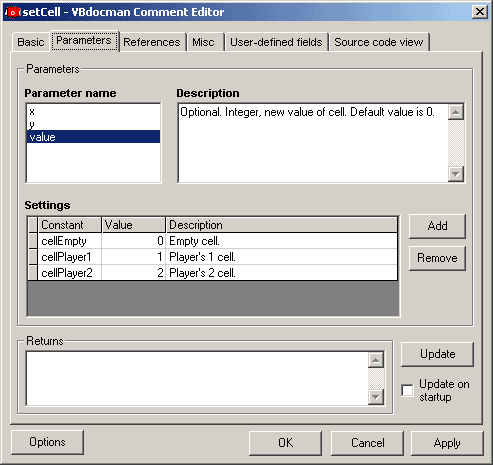
Start VBdocman Comment Editor and select Parameters tab.
This dialog allows to edit description of parameters, their settings and return value of the member. This dialog is enabled only when applicable (methods, properties and events).
Parameters
This section is used for editing parameters.
Parameter name
List of parameters used in comment, not actual parameters - they may differ because user can describe even non-existing parameter using @param tag. Selecting some parameter from this list affects the content of other fields - Description and Settings.
Pressing the Update button sets this list to actual parameters.
Description
Description of selected parameter. This field together with Parameter name field corresponds to @param tag.
Pressing the Update button may update the description to describe actual type of parameter.
Settings
Settings of selected parameter. Corresponds to @set tags. Use Add and Remove buttons to add new or remove selected setting. Click in the cell to edit particular value.
Note: At most three parameters may have settings. Therefore, if three parameters have settings, it is not allowed to edit settings of other parameters.
Returns
Describes the return value. Corresponds to @return tag.
Update button
This is probably the most useful feature of comment editor. It updates all fields in this tab to their actual values. That means that all non-existing parameters are removed from the list as well as their descriptions and settings, if any. Similarly, all new parameters not listed are added with their default description.
That' not all. Editor automatically tries to update also types of parameters and return value. It tries to parse their type from description and if it does not match to the actual one, it is replaced or added. Thus, it is possible to automatically update Required/Optional, type and default value. The rest of description remains unchanged.
Update on startup
When checked, parameters are automatically updated every time the editor is launched. It behaves exactly as thought the Update button was pressed.